
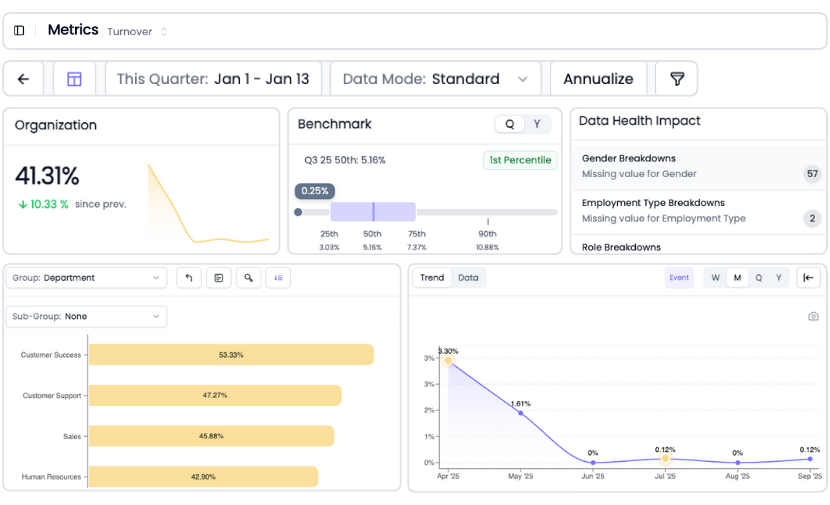
45+ HR metrics. Zero dashboards to build.
Power BI is a best-in-class BI platform. But when your HR team needs workforce dashboards, you're writing DAX formulas, modeling star schemas, and waiting months for a dashboard that still doesn't include benchmarks. HRBench delivers 45+ auto-calculated HR metrics, executive-ready dashboards, and predictive analytics. Live in under a week. No DAX. No data modeling. No BI developer required.
Trusted by HR leaders at:



.png)
Why Power BI isn't the right tool for HR analytics
How HRBench compares to Power BI for HR analytics
Power BI is a best-in-class BI platform. HRBench is a best-in-class HR analytics platform. Here's what that difference means in practice.
45+ auto-calculated HR metrics making your data instantly actionable.
In Power BI, every HR metric must be manually defined and built in DAX. Turnover rate, retention rate, time to fill, cost per hire, span of control. Each one requires calculation logic, date tables, and measure definitions. Get the formula wrong, and your board deck has bad data.
HRBench auto-calculates 45+ workforce metrics the moment your data connects. The calculation logic is built by HR analytics experts who understand how these metrics should work across different industries, company sizes, and data structures.
No DAX. No definitions to write. No edge cases to handle.
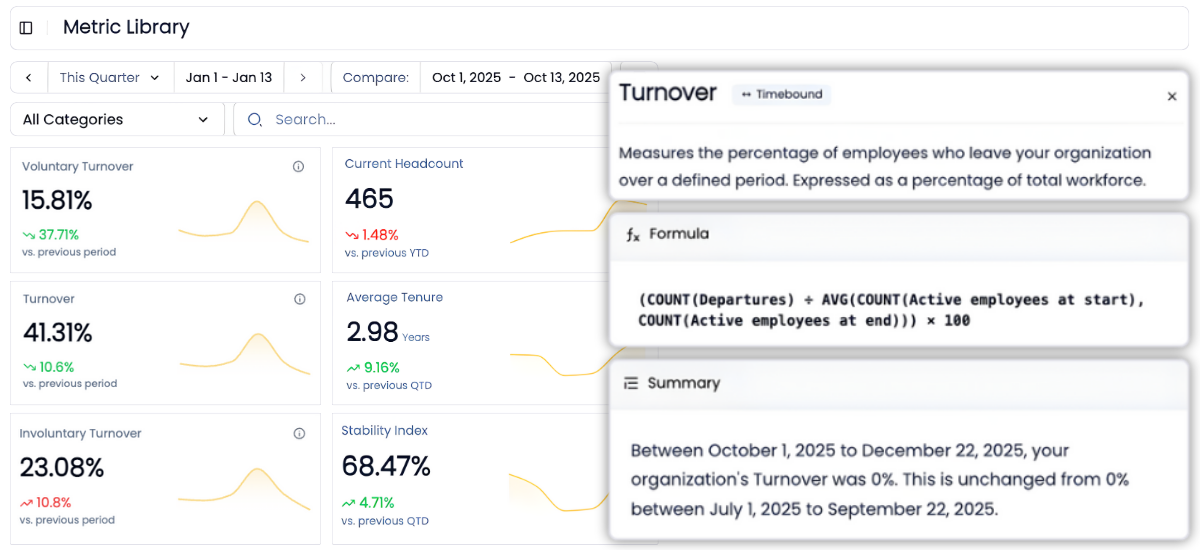
Go from overview to drilling into every metric for insights in a few clicks
Every metric in HRBench is fully drillable.
Click into any tile to explore historical trends, department-level breakdowns, and benchmarks by industry, size, region, and more.
In Power BI, drill-down capability exists but requires intentional data model design, hierarchy configuration, and DAX measures at each level. HRBench puts the drill-down one click away for any team member. No data model required.
Industry benchmarks included with every metric so you know where you stand
Power BI has no workforce benchmarks. None.
If your CEO asks "is our 18% turnover rate good or bad?" Power BI gives you a blank stare. To answer that question, you'd need to purchase benchmark data from PwC Saratoga or Mercer, negotiate a subscription, import the data into your model, and build comparison views. That's a project measured in weeks.
HRBench includes benchmarks for every metric from day one. Industry, company size, and region. Every dashboard view shows how you compare without a separate purchase, import project, or data model.

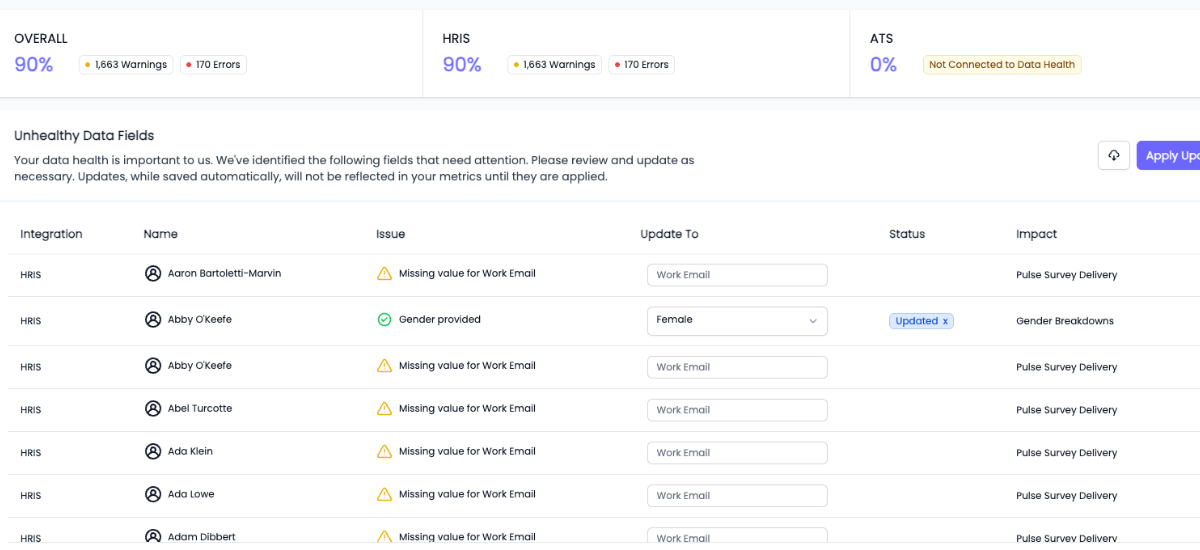
Built-in data health monitoring, so you're confident with clean, validated data
You can't report what you can't trust.
HRBench scans every metric for missing or incomplete data fields and highlights what needs attention, so your reports are always built on clean, complete data.
Power BI has no built-in data validation for HR data. Missing fields, duplicates, and inconsistencies surface only when reports look wrong or leadership questions the numbers. By then, your credibility has already taken the hit.
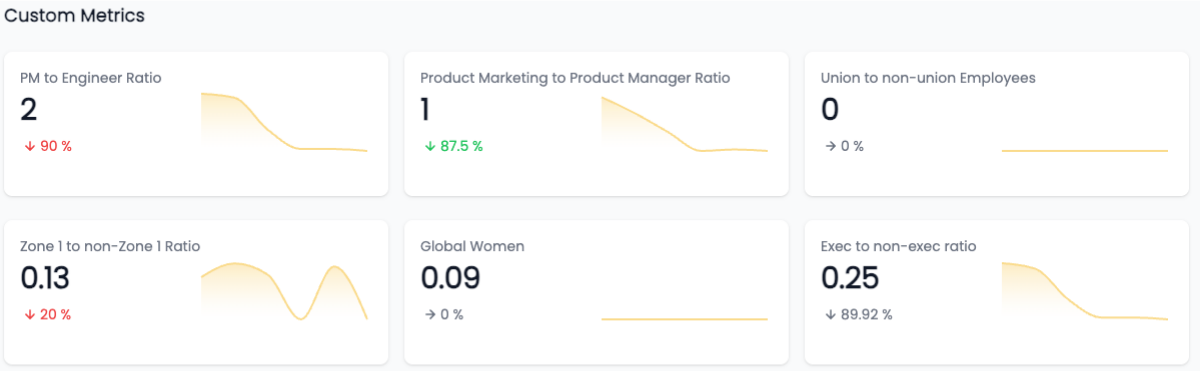
Custom metrics, no SQL required
Need to track something unique to your business?
We support fully custom metrics, built by our team, shown alongside our 45+ standard metrics, and filterable just like the rest.
In Power BI, custom metrics mean custom DAX. More measures to write, test, and maintain. More dependencies on your BI developer. HRBench takes the opposite approach: tell us what you need, and we build it for you.
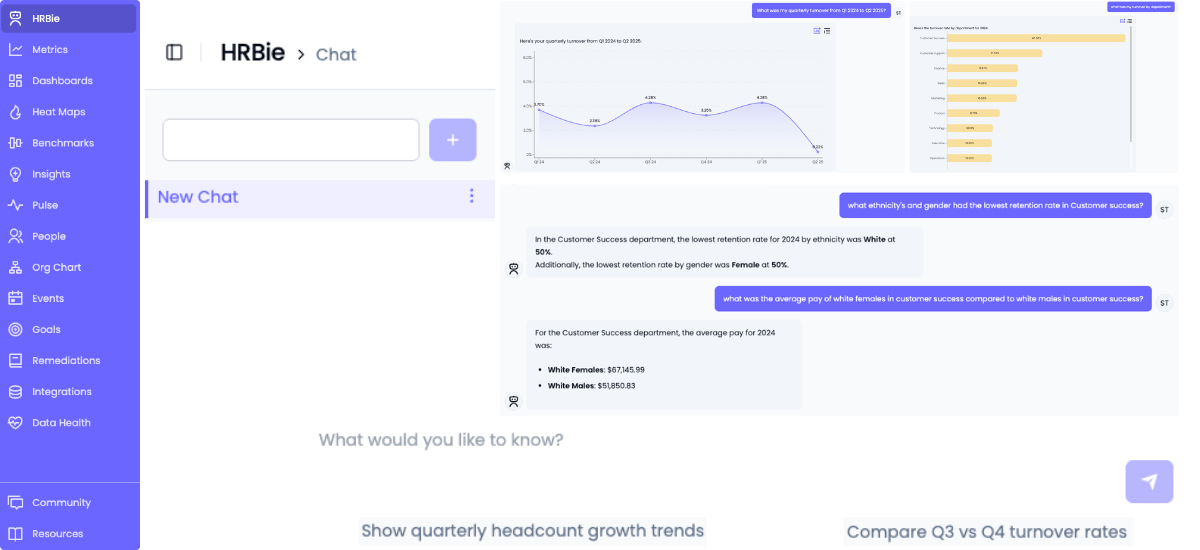
An AI assistant that actually understands HR questions
Power BI's Copilot is a general-purpose AI that works across sales, finance, marketing, and HR data. It can generate visuals, write DAX queries, and summarize reports. But it doesn't understand HR-specific concepts like regrettable attrition, flight risk scoring, span of control benchmarks, or workforce planning scenarios. The quality of its answers depends entirely on how well your data model and DAX measures are built.
Copilot also requires paid Fabric capacity ($262+/month minimum on top of per-user licensing), must be enabled by your admin, and has regional restrictions. And Power BI's legacy Q&A feature is being fully deprecated by December 2026.
HRBie is HRBench's AI assistant built for HR. Ask questions like "What's driving turnover in engineering?" or "How does our retention compare to industry benchmarks?" and get instant answers with visualizations. HRBie works from day one because HRBench's 45+ metrics are already calculated. No Fabric capacity. No admin setup. No additional cost.
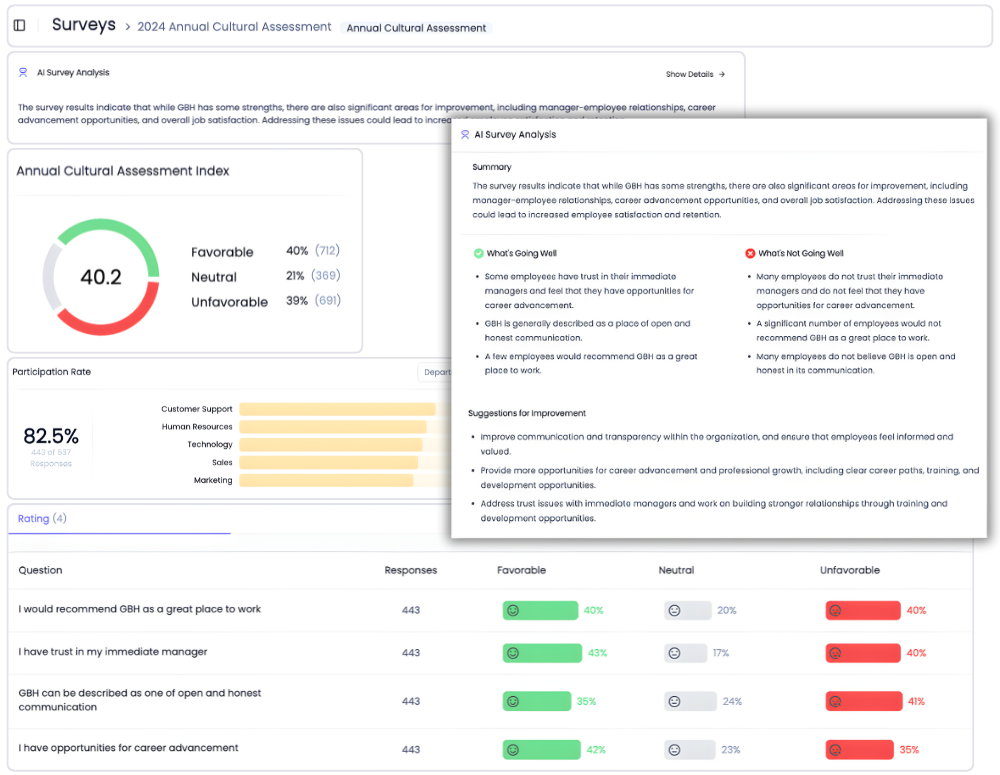
Engagement surveys included, not a separate vendor
Power BI has no native survey tools. To connect engagement data with workforce analytics, you need a separate survey vendor (Culture Amp, Qualtrics, Lattice), an integration project, and ongoing maintenance to keep the two systems in sync.
HRBench includes eNPS, pulse surveys, full engagement surveys, and exit interviews for every customer. Survey data flows directly into the same dashboards as your headcount, turnover, retention, and recruiting metrics.
Want to see the connection between low engagement and high attrition in one view? That's the default in HRBench. In Power BI, it's a multi-vendor integration project that most HR teams never complete.
What happens when HR teams stop building dashboards from scratch
Most HR teams spend weeks pulling reports, cleaning spreadsheets, and stitching together dashboards across systems.
HRBench Analytics eliminates the manual work, so you can focus on driving action.
The conversations have changed from, ‘Here’s the data,’ to ‘I see the trend and the root cause.
.png)
Of my vendors, HRBench is the top of my list. We held onto trailing data from our prior system and integrated it seamlessly. Our team had to do zero lift.

“HRBench gave us confidence. We weren’t spending hours building dashboards anymore. We could focus on strategy, not reporting.”
.jpg)
Frequently Asked Questions
Common questions from HR teams comparing Power BI and HRBench for workforce analytics.
No. HRBench is a purpose-built HR analytics platform that complements your existing BI stack. If your organization uses Power BI for sales, finance, or marketing analytics, that doesn't change. HRBench adds a dedicated HR analytics layer with pre-calculated workforce metrics, benchmarks, predictive analytics, and engagement surveys. Capabilities that Power BI doesn't offer out of the box for HR.
You can. Many organizations do. But building comprehensive HR analytics in Power BI requires DAX expertise to define every metric, data modeling to structure your HR data, custom development to connect HRIS systems (there are no native connectors), and months of development time. Power BI also has no workforce benchmarks, no engagement surveys, and no pre-built predictive models for HR. HRBench delivers all of this out of the box in under a week.
HRBench works alongside Power BI. Many organizations start with basic HR reports in Power BI and realize they need more: industry benchmarks, predictive analytics, engagement correlation, data health monitoring. HRBench adds these capabilities without disrupting your existing Power BI reports. Your BI team can focus on finance and sales dashboards while HRBench handles HR analytics.
Power BI Pro costs $14/user/month. But the total cost of HR analytics in Power BI goes far beyond licensing: custom HRIS connector development (no native connectors for any major HRIS), external benchmark data subscriptions (PwC Saratoga, Mercer), BI developer time to build and maintain dashboards, DAX training for HR staff, and Fabric capacity ($262+/month) if you want Copilot AI features. HRBench offers transparent all-inclusive pricing with HRIS integrations, benchmarks, predictive analytics, engagement surveys, and AI included for every customer.
HRBench connects to 90+ HRIS, ATS, and engagement platforms through pre-built APIs. Workday, ADP, UKG, BambooHR, Paylocity, Greenhouse, Lever, and more. These are purpose-built HR integrations, not generic data connectors. Data syncs automatically on a daily basis. No custom development, no middleware, no third-party connector licensing.
HRBench customers go live in under 7 days. Some have launched in as little as 24 hours. In Power BI, building basic HR dashboards with templates and clean data takes 3 to 7 days. But comprehensive HR analytics from scratch takes several months, and full enterprise BI deployments run 12 to 14 weeks. That's before factoring in HRIS integration development, benchmark data sourcing, and DAX training.
Yes. HRBench includes eNPS, pulse surveys, full engagement surveys, and exit interviews for every customer. Survey data flows directly into workforce analytics dashboards, so you can correlate engagement scores with turnover, retention, and performance in one view. Power BI has no native survey tools. You'd need a separate vendor and a manual data integration project.
Power BI Copilot is a general-purpose AI requiring paid Fabric capacity ($262+/month minimum) that doesn't understand HR concepts natively. It answers based on whatever data model and DAX measures you've built. If your model is incomplete, so are the answers. HRBie is an HR-specific AI assistant included for every HRBench customer at no additional cost. It works immediately because HRBench's 45+ metrics are already calculated.
Power BI is best for organizations with dedicated data teams that need a flexible, general-purpose analytics platform across multiple departments. If you have BI developers who know DAX, data engineers who can build HRIS connectors, and the budget for training, external benchmark data, and Fabric capacity, Power BI can handle HR analytics among many other use cases.
HRBench is built for mid-market HR teams at PE-backed and growth-stage companies (500 to 5,000 employees) who need trusted workforce analytics and executive-ready dashboards without hiring a BI developer, learning DAX, or spending months building data models. If your team is lean, your board wants answers this quarter, and you need benchmarks, predictive analytics, and engagement data in one platform, HRBench is the faster path.
See your workforce data in 20 minutes
Book a personalized walkthrough and get a custom benchmark report built from your own headcount, turnover, and cost data. You'll leave the call knowing exactly what HRBench can surface from your HRIS, ATS, and engagement systems.
- A live walkthrough mapped to your company size, industry, and systems
- A custom benchmark report comparing your metrics to peer companies
- A clear view of what an HRBench rollout would look like for your team