
People analytics with everything included
Crunchr is a strong analytics platform for European enterprises. HRBench gives mid-market HR teams 45+ auto-calculated metrics, engagement surveys, workforce benchmarks, and predictive analytics in one platform. You're live in under a week.
Trusted by HR leaders at:



.png)
Where Crunchr Falls Short for Mid-Market HR Teams
How HRBench Outperforms Crunchr
HRBench delivers a more complete people intelligence platform by including engagement surveys, embedded benchmarks, and predictive analytics, without requiring separate tools or add-on purchases.
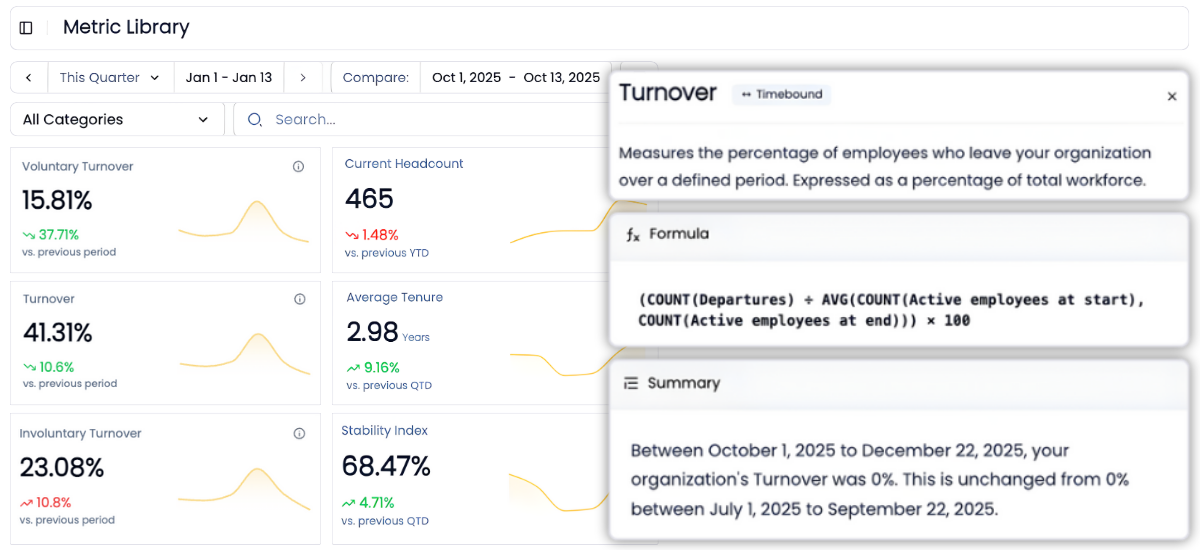
45+ auto-calculated HR metrics making your data instantly actionable.
Crunchr offers hundreds of pre-built metrics across all HR domains — recruitment, retention, diversity, performance, rewards, and more. The breadth is impressive, and the coverage is among the widest in the category.
The difference is when you get value. Crunchr's metrics become available after a 2 to 4 week implementation that includes data ingestion, cleaning, and configuration. HRBench auto-calculates 45+ workforce metrics the moment your data connects. Headcount, turnover, span of control, revenue per employee, cost of turnover, retention rate. Every metric is drillable by department, role, gender, tenure, and more.
No implementation queue. No configuration wait. Just answers.
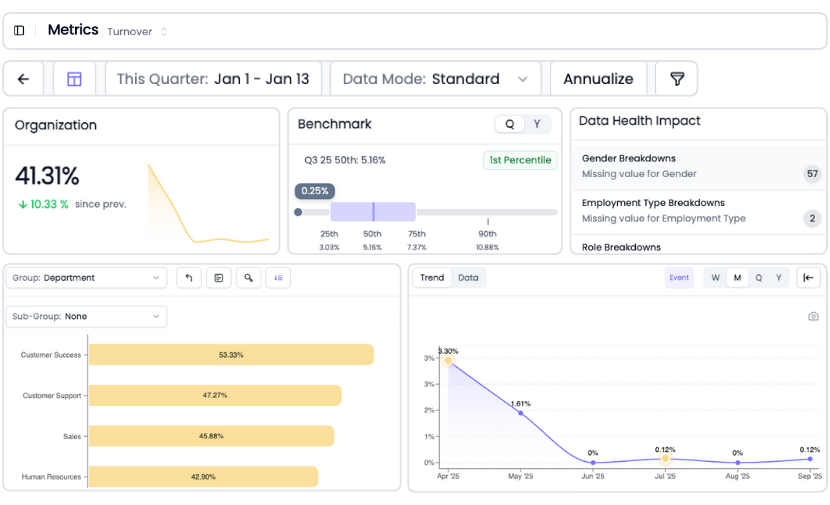
Go from overview to drilling into every metric for insights in a few clicks
Every metric in HRBench is fully drillable.
Click into any tile to explore historical trends, department-level breakdowns, and benchmarks by industry, size, region, and more.
Crunchr also supports interactive drill-down through its dashboards and the Crunchr Assistant can filter and explore underlying data via natural language. Both platforms let you dig deeper. HRBench makes the drill-down one click away for any team member from the moment data connects.
Industry benchmarks included with every metric so you know where you stand
When leadership asks "how do we compare?" you need an answer in the same view as your data, not in a separate benchmarking section.
HRBench embeds benchmarking against your industry, company size, and region inside every metric. Turnover at 4.92% against a 4.60% benchmark at the 55th percentile. Retention at 94.95% against 94.62% at the 54th percentile.
Crunchr offers industry benchmarking capabilities, and the data quality is solid for their European enterprise customer base. But the benchmarks are not embedded directly alongside every metric in every dashboard view. HRBench puts the comparison right where you are already looking.

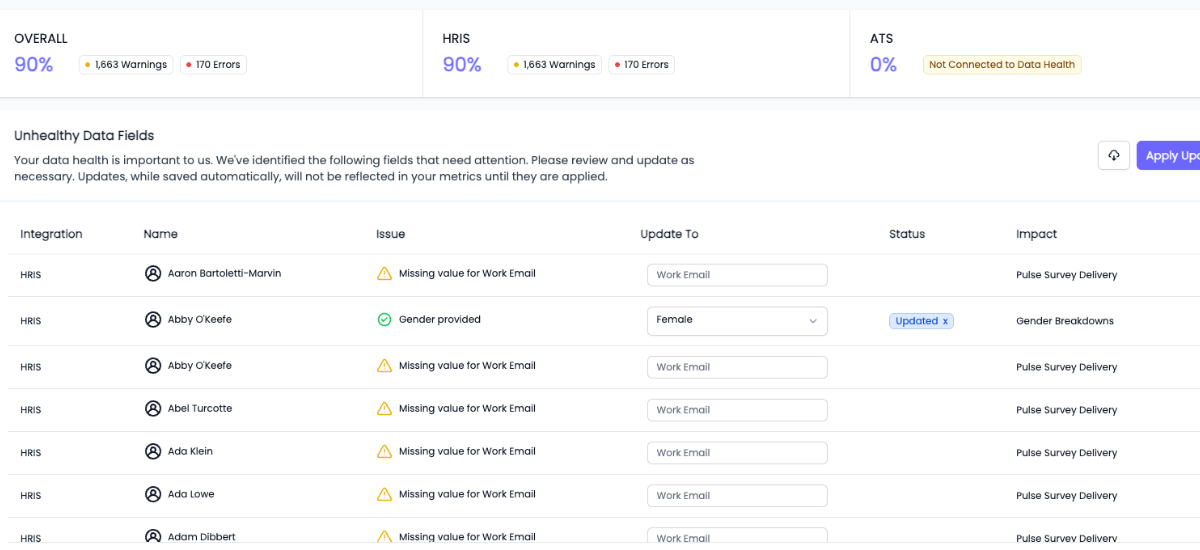
Built-in data health monitoring, so you're confident with clean, validated data
You can't report what you can't trust.
HRBench scans every metric for missing or incomplete data fields and highlights what needs attention, so your reports are always built on clean, complete data.
Crunchr takes data quality seriously — their data engineers help clean, transform, and harmonize your data during implementation, and their built-in data lake consolidates multiple sources into a single source of truth. That is a strong foundation. But data quality is not a one-time event. New hires, system changes, and integration updates can introduce issues at any time. HRBench catches those issues proactively, before they reach a dashboard.
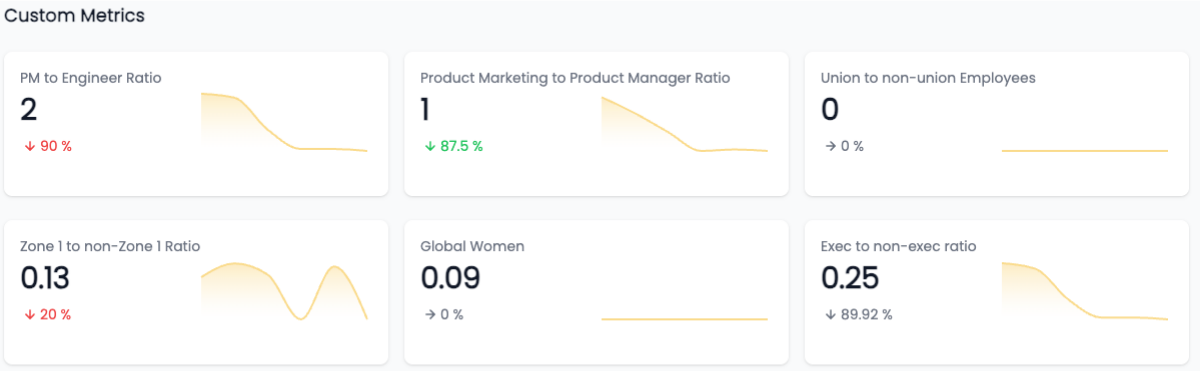
Custom metrics, no SQL required
Need to track something unique to your business?
We support fully custom metrics, built by our team, shown alongside our 45+ standard metrics, and filterable just like the rest.
Crunchr also supports custom metrics with assistance from their data engineering team. Both vendors take custom metrics off your plate. The difference is that HRBench's custom metrics live alongside your auto-calculated metrics and benchmarks — fully integrated from day one.
AI-powered workforce answers, built for your team
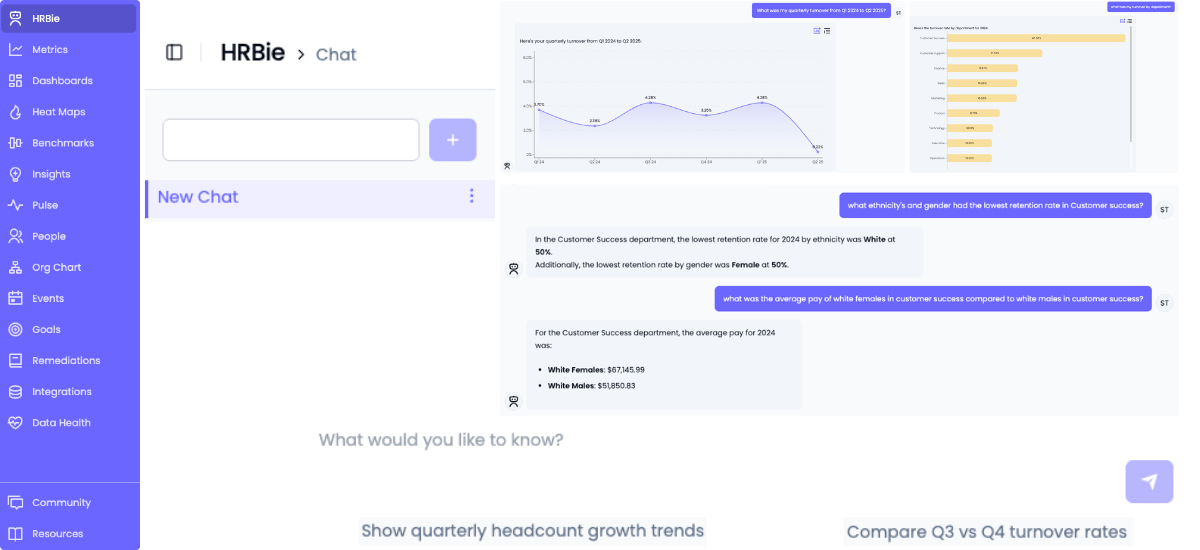
Both HRBench and Crunchr offer AI assistants for natural language workforce queries.
The Crunchr Assistant is a generative AI co-pilot that lets users ask workforce questions in natural language and receive instant answers with narrative context and follow-up suggestions. It can generate dashboards on the fly and filter data through conversation. It is a well-designed tool that makes people analytics accessible to non-technical users.
HRBie is HRBench's AI assistant built for mid-market HR teams. Ask natural language questions about your workforce data and get instant answers, visualizations, and trend analysis. No query builder or technical knowledge needed.
The difference: the Crunchr Assistant requires a fully implemented Crunchr environment with data ingestion complete. HRBie works the moment your data connects — because HRBench's 45+ metrics are already calculated and ready to query.
Engagement surveys included, not sold separately
Crunchr does not include native survey tools. To correlate engagement data with turnover, retention, and workforce metrics, you need a separate survey platform — CultureAmp, Glint, Qualtrics, or one of several others — plus the integration to keep data flowing between systems.
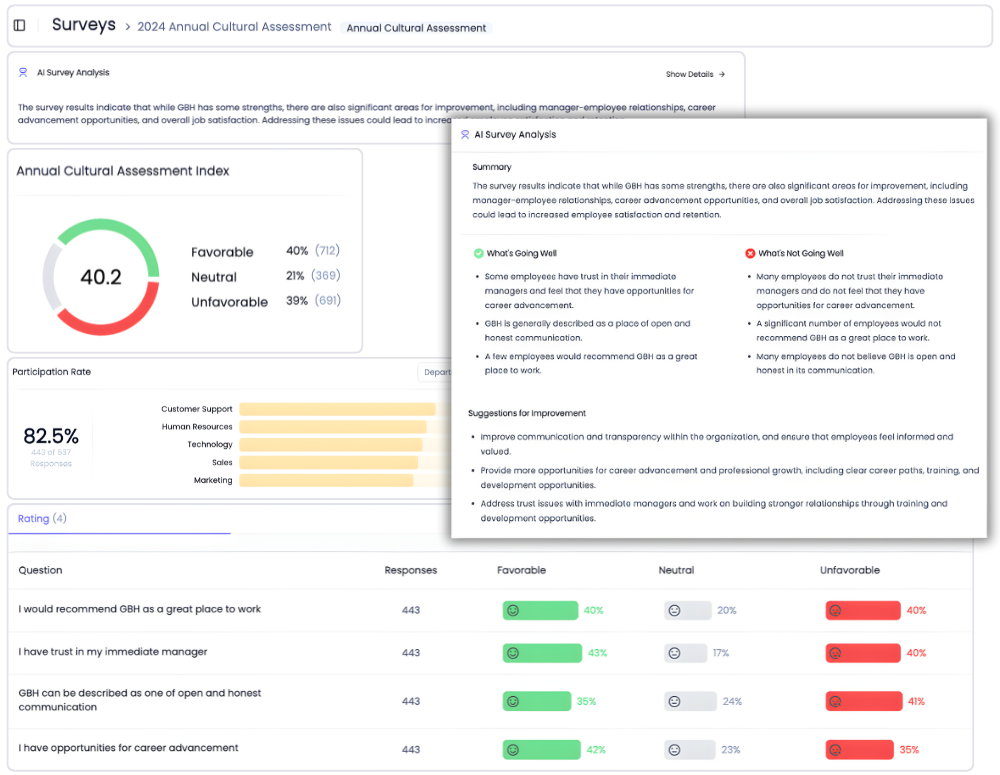
HRBench includes eNPS, pulse surveys, full engagement surveys, and exit interviews for every customer. Survey data flows directly into your analytics dashboards, so you can see the connection between engagement scores and workforce outcomes without a separate tool, a separate vendor, or a separate budget line.
From tactical tracking to strategic impact, HRBench is built for people teams
Most HR teams spend weeks pulling reports, cleaning spreadsheets, and stitching together dashboards across systems.
HRBench Analytics eliminates the manual work, so you can focus on driving action.
The conversations have changed from, ‘Here’s the data,’ to ‘I see the trend and the root cause.
.png)
Of my vendors, HRBench is the top of my list. We held onto trailing data from our prior system and integrated it seamlessly. Our team had to do zero lift.

“HRBench gave us confidence. We weren’t spending hours building dashboards anymore. We could focus on strategy, not reporting.”
.jpg)
Frequently Asked Questions
Common questions from HR teams comparing Visier and HRBench.
It depends on your needs. Crunchr is a well-regarded people analytics platform with hundreds of pre-built metrics, a generative AI assistant, and a strong reputation among European enterprises. Organizations with 1,000+ employees, complex multi-system environments, and a need for strategic workforce planning will find Crunchr to be a capable platform. HRBench is built for mid-market HR teams at PE-backed and growth-stage companies who need analytics, engagement surveys, benchmarks, and predictive analytics in one platform — without weeks of implementation. If your priority is fast time to value, included surveys, and a platform your HR team can use on day one — HRBench is the better fit.
Yes. HRBench integrates with 90+ HRIS and ATS platforms through pre-built APIs, including Workday, UKG, BambooHR, ADP, Paylocity, and more. Data syncs automatically on a daily basis. Crunchr also offers broad integration capabilities with Workday, SAP SuccessFactors, Oracle HCM, ADP, Greenhouse, and others. Crunchr's flexible data model can ingest data from virtually any HR system. However, some G2 reviewers note that the library of out-of-the-box integrations could be broader, and API support has been cited as an area for improvement.
Crunchr's published pricing starts at $6.99 per employee per month, with custom enterprise pricing for larger organizations. Advanced modules and custom integrations may add to the total cost. HRBench offers transparent mid-market pricing with engagement surveys, benchmarks, predictive analytics, and org charts included for every customer. No hidden modules, no separate SKUs, no surprise add-ons.
Yes. HRBench forecasts 25+ workforce metrics including departures, turnover, new hire turnover, retention rate, span of control, and headcount growth. You can forecast 3 to 6 months out and sort by positive, negative, or neutral impact. Crunchr also offers predictive forecasting and scenario planning capabilities. Both platforms help you look ahead — HRBench makes predictions available immediately on data connection.
Yes. HRBie is HRBench's built-in AI assistant. You can ask natural language questions about your workforce data and get instant answers, visualizations, and trend analysis. No query builder or technical knowledge needed. Crunchr's AI Assistant is also strong — it provides natural language answers with narrative context and can generate dashboards on the fly. Both are solid tools. The difference is that HRBie delivers value immediately because HRBench's metrics are auto-calculated, while the Crunchr Assistant requires a fully implemented environment.
No. Crunchr does not include native survey tools. To correlate engagement with workforce analytics, you need a separate survey vendor (CultureAmp, Glint, Qualtrics, etc.) and an integration to keep data flowing between systems. HRBench includes eNPS, pulse surveys, full engagement surveys, and exit interviews for every customer. Engagement data flows directly into your analytics dashboards — no separate tool, no integration project.
HRBench customers go live in under 7 days. Some have launched in as little as 24 hours. Your data connects, metrics auto-calculate, and benchmarks populate immediately. Crunchr's implementation typically runs 2 to 4 weeks, with data ingestion, cleaning, transformation, and configuration. That is fast by enterprise standards — significantly faster than competitors like Visier. But mid-market HR teams who need answers this week will find HRBench's timeline hard to beat.
Yes. Crunchr includes a strategic workforce planning module with scenario building, headcount forecasting, cost analysis, and collaborative planning across departments. This is one of Crunchr's genuine strengths. HRBench includes org charts with workforce planning capabilities, offering a more visual, integrated approach. For mid-market teams, this combination of real-time org visualization and auto-calculated metrics provides a practical foundation for workforce planning.
Crunchr is best for large enterprises — particularly European organizations — with 1,000+ employees and complex multi-system HR environments. If you need hundreds of pre-built metrics, strategic workforce planning, a generative AI assistant, and GDPR-first compliance, and you have the time for a 2 to 4 week implementation, Crunchr is a strong choice.
HRBench is built for mid-market and PE-backed companies with 500 to 5,000 employees who need trusted workforce analytics, engagement surveys, benchmarks, and predictive analytics — all in one platform, live in under a week. If you want everything included without separate vendors or add-on modules, HRBench is the right fit.
See your workforce data in 20 minutes
Book a personalized walkthrough and get a custom benchmark report built from your own headcount, turnover, and cost data. You'll leave the call knowing exactly what HRBench can surface from your HRIS, ATS, and engagement systems.
- A live walkthrough mapped to your company size, industry, and systems
- A custom benchmark report comparing your metrics to peer companies
- A clear view of what an HRBench rollout would look like for your team