
Stop exporting UKG data into spreadsheets.
UKG Pro handles payroll and HR ops. But when leadership asks for a dashboard, you're stuck in Cognos, exporting to Excel, or submitting a support ticket. HRBench connects to your UKG data and delivers 45+ auto-calculated metrics and executive-ready dashboards. Live in under a week. No Cognos expertise required.
Trusted by HR leaders at:




.png)
Where UKG Pro reporting falls short for HR teams
How HRBench outperforms UKG Pro reporting
HRBench layers on top of UKG Pro to fill the reporting gaps, without replacing your core HR system.
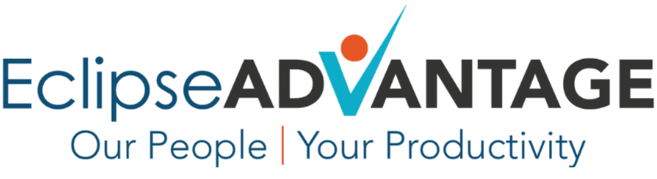
45+ auto calculated HR metrics making your data instantly actionable.
UKG Pro's Cognos analytics requires selecting the right package, choosing fields, and building queries. Reviewers consistently cite the steep learning curve and difficulty creating even basic custom reports.
HRBench auto-calculates 45+ workforce metrics the moment your UKG data connects. Headcount, turnover, span of control, revenue per employee, cost of turnover, retention rate. Every metric is drillable by department, role, gender, tenure, and more.
No packages. No query builder. No drag-and-drop configuration. Just answers.
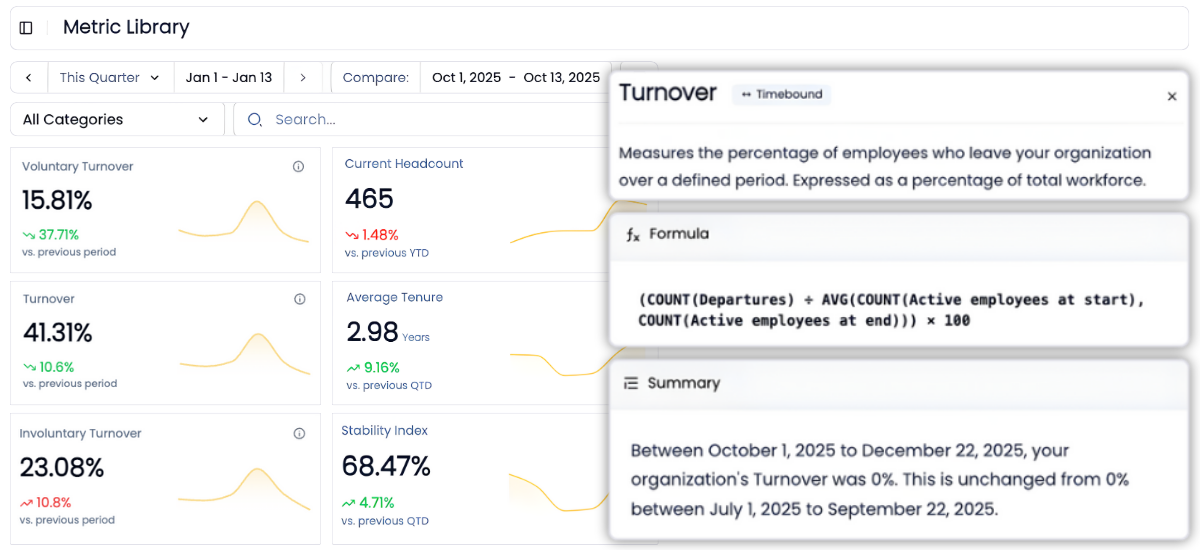
Go from overview to drilling into every metric for insights in a few clicks
Every metric in HRBench is fully drillable.
Click into any tile to explore historical trends, department-level breakdowns, and benchmarks by industry, size, region, and more.
UKG Pro's Cognos interface offers drill-down capability, but it requires familiarity with the BI environment and Reporting Administrator access. HRBench puts the drill-down one click away for any team member. No Cognos training needed.
Industry benchmarks included with every metric so you know where you stand
When leadership asks "how do we compare?" you need an answer in the same view as your data, not locked behind a subscription tier.
HRBench embeds benchmarking against your industry, company size, and region inside every metric. Turnover at 4.92% against a 4.60% benchmark at the 55th percentile. Retention at 94.95% against 94.62% at the 54th percentile.
UKG Pro provides workforce benchmarks through its dataset, but reviewers note that access depends on your subscription tier and module configuration. HRBench includes benchmarks for every customer, with every metric, from day one.

Built-in data health monitoring, so you're confident with clean, validated data
You can't report what you can't trust.
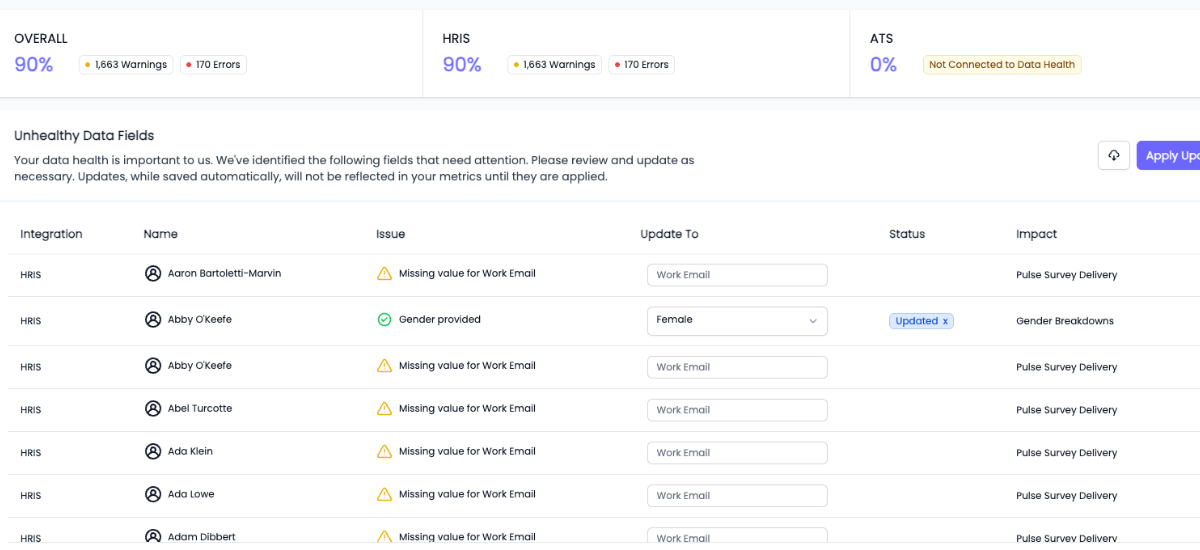
HRBench scans every metric for missing or incomplete data fields and highlights what needs attention, so your reports are always built on clean, complete data.
UKG Pro's Audit Tables track what changed and who changed it. But they don't proactively scan for missing or incomplete fields. HRBench catches data gaps before they reach a dashboard or a boardroom.
Custom metrics, no SQL required
Need to track something unique to your business?
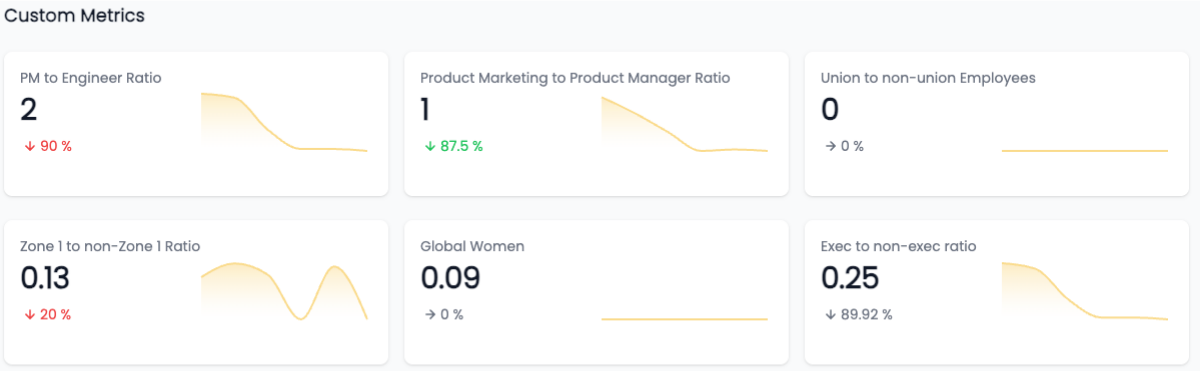
We support fully custom metrics, built by our team, shown alongside our 45+ standard metrics, and filterable just like the rest.
UKG Pro allows custom report creation through Cognos, but it requires package selection, field mapping, and BI expertise. HRBench takes the opposite approach: tell us what you need, and we build it for you. No Cognos. No query language. Just answers.
AI-powered workforce answers, built for your team
UKG recently introduced Bryte AI for natural language queries. It's a step in the right direction, but it's a newer capability with limited scope across the platform.
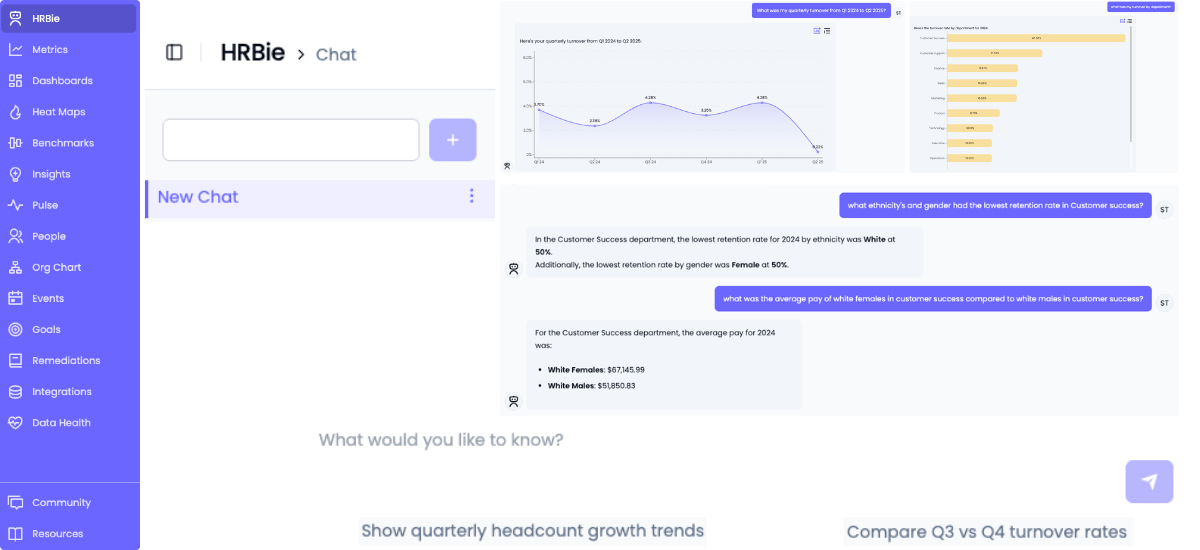
HRBie is HRBench's AI assistant built for mid-market HR teams. Ask natural language questions about your workforce data and get instant answers, visualizations, and trend analysis. "What's our turnover by department this quarter?" "Which teams have the highest flight risk?" HRBie answers in seconds, not tickets.
The difference: HRBie works across all your connected data sources, not just UKG. And because HRBench's 45+ metrics are already calculated, HRBie can answer questions the moment your data connects.
Engagement surveys that flow into the same dashboard as your workforce data
UKG Pro includes engagement survey capabilities. If you're already using them, that's a strength worth keeping.
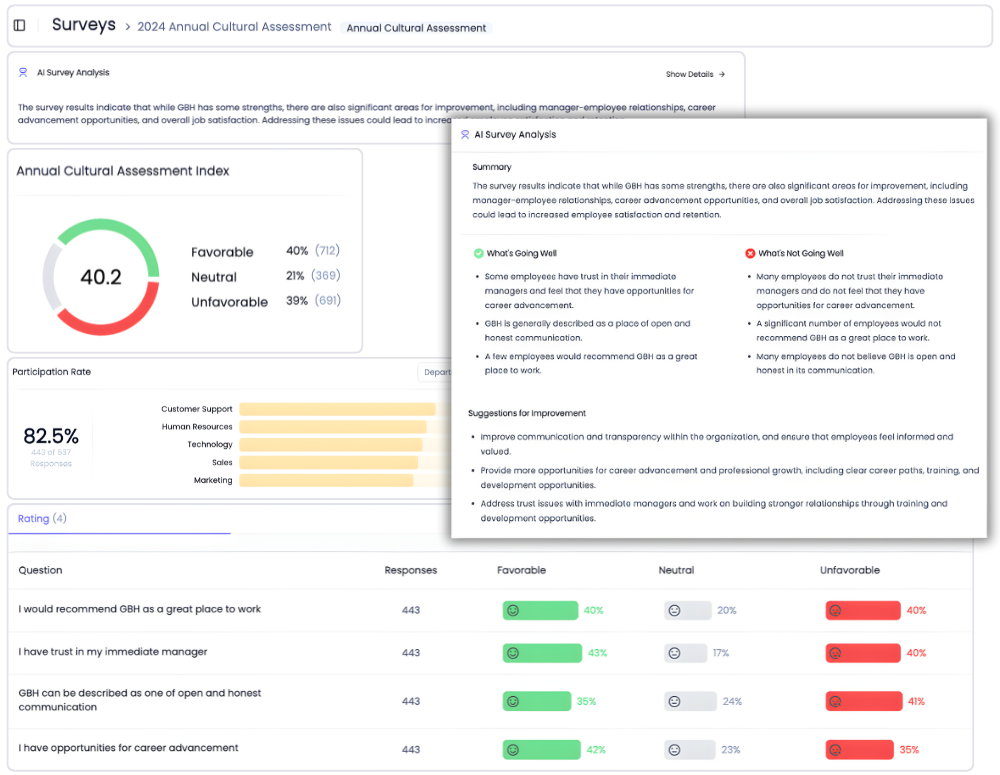
Where HRBench goes further: survey data feeds directly into the same dashboards as your headcount, turnover, retention, and recruiting metrics. You can see engagement scores alongside flight risk, filter by department, and spot the connection between low engagement and high attrition in one view.
HRBench includes eNPS, pulse surveys, full engagement surveys, and exit interviews for every customer. If you're running surveys in UKG, HRBench can ingest that data alongside your other sources.
Why HR teams add HRBench to their UKG stack
Most HR teams spend weeks pulling reports, cleaning spreadsheets, and stitching together dashboards across systems.
HRBench Analytics eliminates the manual work, so you can focus on driving action.
The conversations have changed from, ‘Here’s the data,’ to ‘I see the trend and the root cause.
.png)
Of my vendors, HRBench is the top of my list. We held onto trailing data from our prior system and integrated it seamlessly. Our team had to do zero lift.

“HRBench gave us confidence. We weren’t spending hours building dashboards anymore. We could focus on strategy, not reporting.”
.jpg)
Frequently Asked Questions
Common questions from HR teams comparing UKG Pro reporting and HRBench.
No. HRBench is an analytics layer that sits on top of UKG Pro. Your payroll, benefits, onboarding, and HR operations stay in UKG Pro. HRBench connects to your UKG data through a secure API and adds reporting, benchmarking, and predictive analytics capabilities that UKG Pro's native tools make difficult to access.
Yes. HRBench integrates directly with UKG Pro through pre-built APIs. Data syncs automatically on a daily basis. No IT project, no middleware, and no manual data exports needed. Your UKG data flows into HRBench dashboards automatically.
UKG Pro's Cognos-based People Analytics tool is powerful. It supports custom reports, dashboard visualizations, and event monitoring. But it requires Reporting Administrator access, Cognos training, and BI expertise to get value from it. G2 and Capterra reviewers consistently cite the steep learning curve and difficulty building custom reports. HRBench eliminates the Cognos layer entirely. Metrics auto-calculate, dashboards are pre-built and customizable, and every team member can access and drill into data without technical training.
It depends on your team. If you have a trained Cognos administrator and an analytics team comfortable in the BI interface, UKG Pro's native tools may be sufficient for standard HR reporting. If your HR team is lean, doesn't have Cognos expertise, and needs executive-ready dashboards, cross-system reporting, and workforce benchmarks without a 6-month setup, HRBench fills those gaps.
HRBench customers go live in under 7 days. Some have launched in as little as 24 hours. Your UKG data connects through a secure API, metrics auto-calculate, and benchmarks populate immediately. By comparison, UKG Pro implementations typically run 6 to 12 months, and setting up custom Cognos reports adds additional time beyond the core system deployment.
Yes. This is one of the most common reasons UKG Pro customers choose HRBench. UKG Pro reports only on UKG data. HRBench connects to 90+ HRIS and ATS platforms and unifies all your people data into a single dashboard. If you run payroll in UKG but track applicants in Greenhouse and engagement in Culture Amp, HRBench is the only place where all three data sources appear in the same report.
UKG Pro pricing typically ranges from $20 to $37 per employee per month depending on modules, with implementation fees of 15 to 40% of annual spend. Reporting is included in the base subscription, but advanced analytics and custom report development add to the cost. HRBench offers transparent mid-market pricing with engagement surveys, benchmarks, predictive analytics, and all reporting capabilities included for every customer.
Yes. HRBench includes eNPS, pulse surveys, full engagement surveys, and exit interviews for every customer. Survey data flows directly into your analytics dashboards, so you can correlate engagement scores with turnover, retention, and workforce metrics in one view. UKG Pro also includes engagement survey capabilities. If you're already using UKG's survey tools, HRBench can ingest that data alongside other sources.
HRBench provides dedicated onboarding and live support. Customers consistently describe the team as feeling like an extension of their own HR department. UKG Pro support is ticket-based. Reviewers on G2 and Capterra frequently cite slow response times and difficulty escalating issues.
UKG Pro's native Cognos reporting is best for organizations with 500+ employees that have a dedicated analytics team or Cognos-trained administrator who can build and maintain custom reports, dashboards, and event monitors. If you have the internal expertise, Cognos is a powerful BI engine.
HRBench is built for mid-market HR teams at PE-backed and growth-stage companies (500 to 5,000 employees) who need trusted workforce analytics and executive-ready dashboards without hiring an analytics specialist or learning a BI tool. If your team is lean and leadership wants answers this quarter, HRBench is the faster path.
Schedule a 20-minute demo
See how HRBench transforms your HR data into insights, instant visibility, benchmarking, and data confidence.
- A walkthrough of HRBench's intuitive dashboards and analytics tools.
- Insights into integrating HRBench with your existing HR systems.
- Understanding how HRBench supports data-driven HR strategies.