
The analytics layer Workday doesn't include.
Workday handles core HR and payroll. But when the board asks for a workforce dashboard, you're building custom reports across three different report architectures, waiting on Prism Analytics configurations, or exporting to Excel. HRBench connects to your Workday data and delivers 45+ auto-calculated metrics and executive-ready dashboards. Live in under a week. No report writing expertise required.
Trusted by HR leaders at:




.png)
Where Workday reporting falls short for mid-market HR teams
How HRBench outperforms Workday reporting
HRBench layers on top of Workday to fill the reporting gaps, without replacing your core HR system.
45+ auto-calculated HR metrics making your data instantly actionable.
Workday's reporting requires selecting report types, configuring data sources, applying security constraints, and building queries. Reviewers consistently cite that creating even basic custom reports requires significant time and training.
HRBench auto-calculates 45+ workforce metrics the moment your Workday data connects. Headcount, turnover, span of control, revenue per employee, cost of turnover, retention rate. Every metric is drillable by department, role, gender, tenure, and more.
No report types. No data modeling. No query building. Just answers.
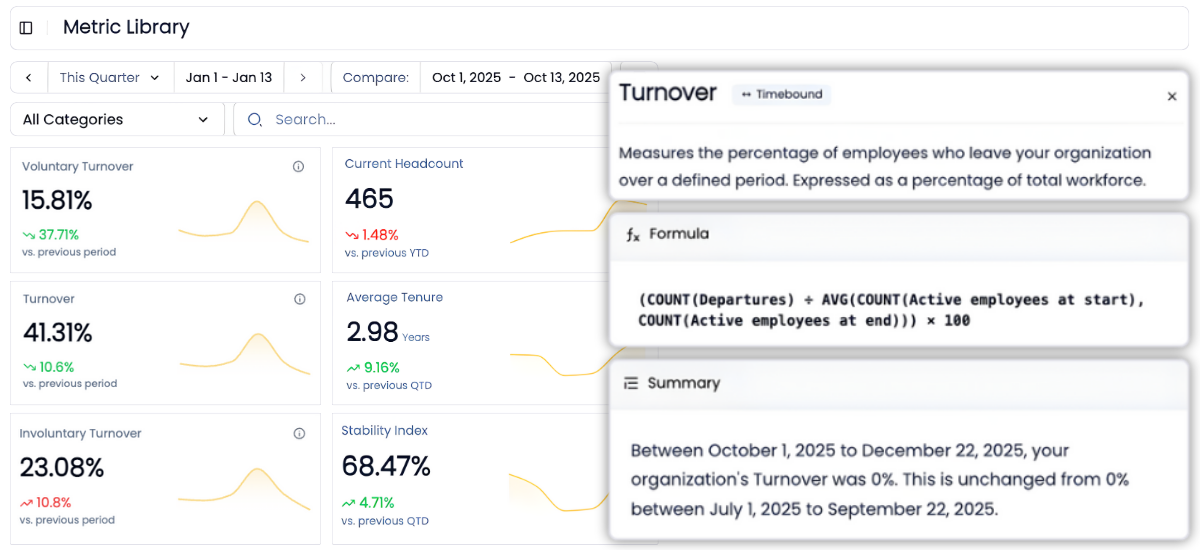
Go from overview to drilling into every metric for insights in a few clicks
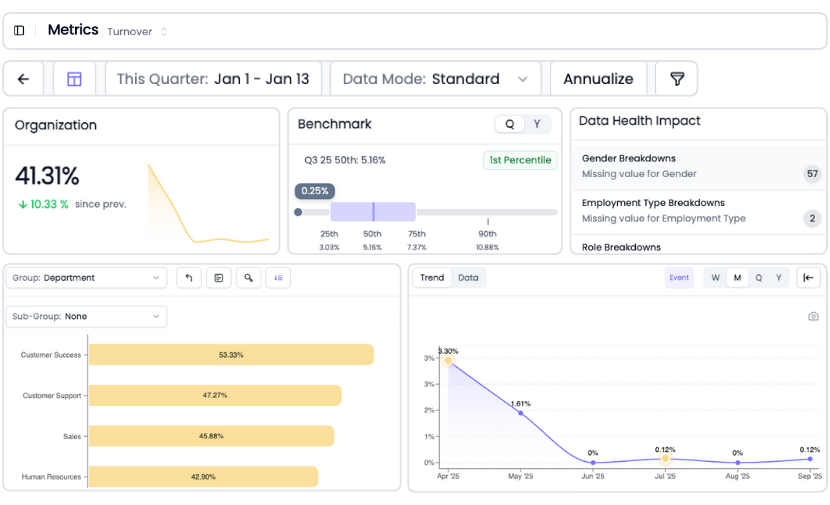
Every metric in HRBench is fully drillable.
Click into any tile to explore historical trends, department-level breakdowns, and benchmarks by industry, size, region, and more.
Workday's Discovery Boards offer dashboard capabilities, but building views that answer executive questions requires technical expertise and Prism Analytics licensing. HRBench puts the drill-down one click away for any team member. No report architectures to learn.
Industry benchmarks included with every metric so you know where you stand
When leadership asks "how do we compare?" you need an answer in the same view as your data, not locked behind a Prism Analytics add-on.
HRBench embeds benchmarking against your industry, company size, and region inside every metric. Turnover at 4.92% against a 4.60% benchmark at the 55th percentile. Retention at 94.95% against 94.62% at the 54th percentile.
Workday provides some benchmarking through its customer dataset, but reviewers note that benchmarking capabilities are limited compared to dedicated analytics platforms and access may depend on subscription tier. HRBench includes benchmarks for every customer, with every metric, from day one.

Built-in data health monitoring, so you're confident with clean, validated data
You can't report what you can't trust.
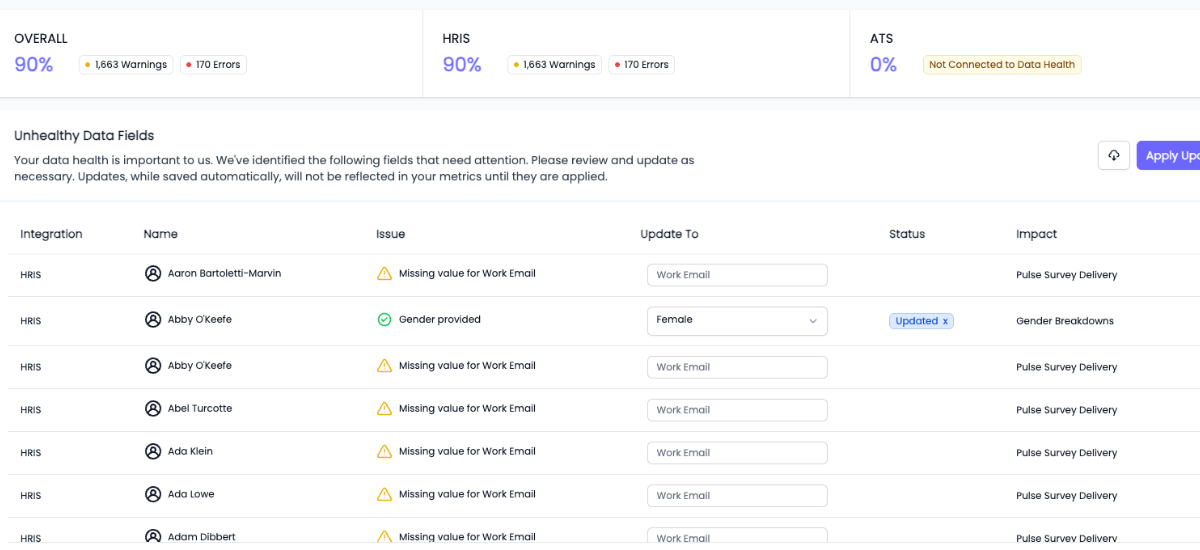
HRBench scans every metric for missing or incomplete data fields and highlights what needs attention, so your reports are always built on clean, complete data.
Workday requires that business processes be fully finalized before data appears in reports. Missing or inaccurate data shows up because of poorly finalized processes, incorrect security settings, or unintended filters. Issues often surface only when leadership questions the numbers. HRBench catches data gaps before they reach a dashboard.
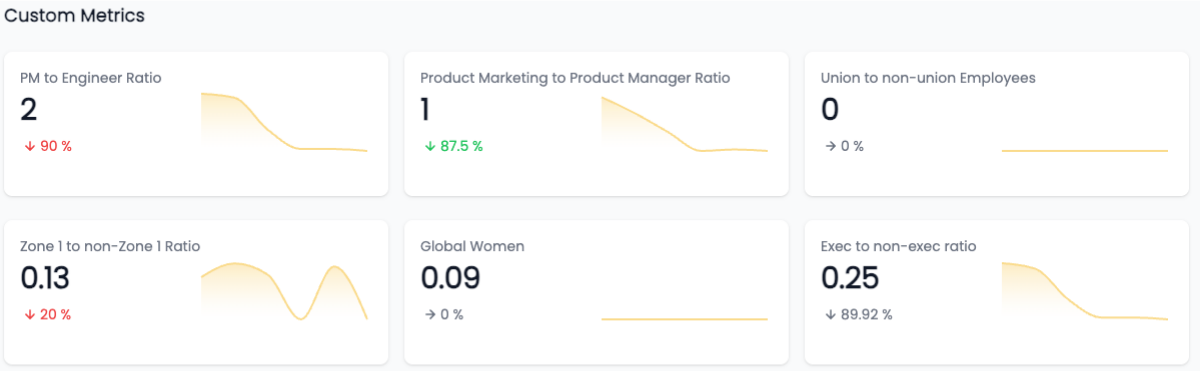
Custom metrics, no SQL required
Need to track something unique to your business?
We support fully custom metrics, built by our team, shown alongside our 45+ standard metrics, and filterable just like the rest.
Workday's custom reporting requires navigating Matrix Reports, Advanced Reports, or Composite Reports depending on the data you need. Each architecture has different capabilities and constraints. HRBench takes the opposite approach: tell us what you need, and we build it for you. No report types. No data modeling. Just answers.
AI-powered workforce answers, built for your team
Workday has invested in AI through what they call Augmented Analytics. It surfaces workforce trends, detects risks, and provides automated insights. These are real capabilities.
The catch: Augmented Analytics requires Prism Analytics licensing. Without Prism, your Workday analytics stay limited to native reporting and Discovery Boards.
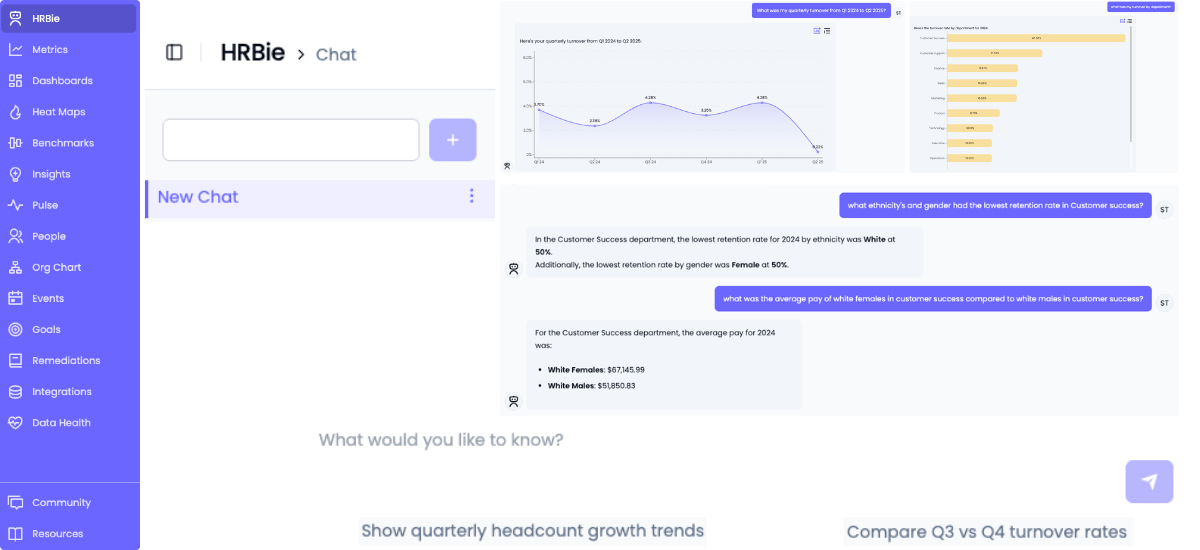
HRBie is HRBench's AI assistant built for mid-market HR teams. Ask natural language questions about your workforce data and get instant answers, visualizations, and trend analysis. "What's our voluntary turnover by department?" "Show me headcount growth since we raised our last round." HRBie answers in seconds.
The difference: HRBie is included for every customer. No Prism. No add-on module. No configuration. It works the moment your data connects because HRBench's 45+ metrics are already calculated and ready to query.
Engagement surveys included, not sold as a separate vendor
Workday does not include native engagement survey tools. Most Workday customers rely on separate vendors like Peakon or Glint, which require integration projects and ongoing maintenance to keep survey data connected to workforce analytics.
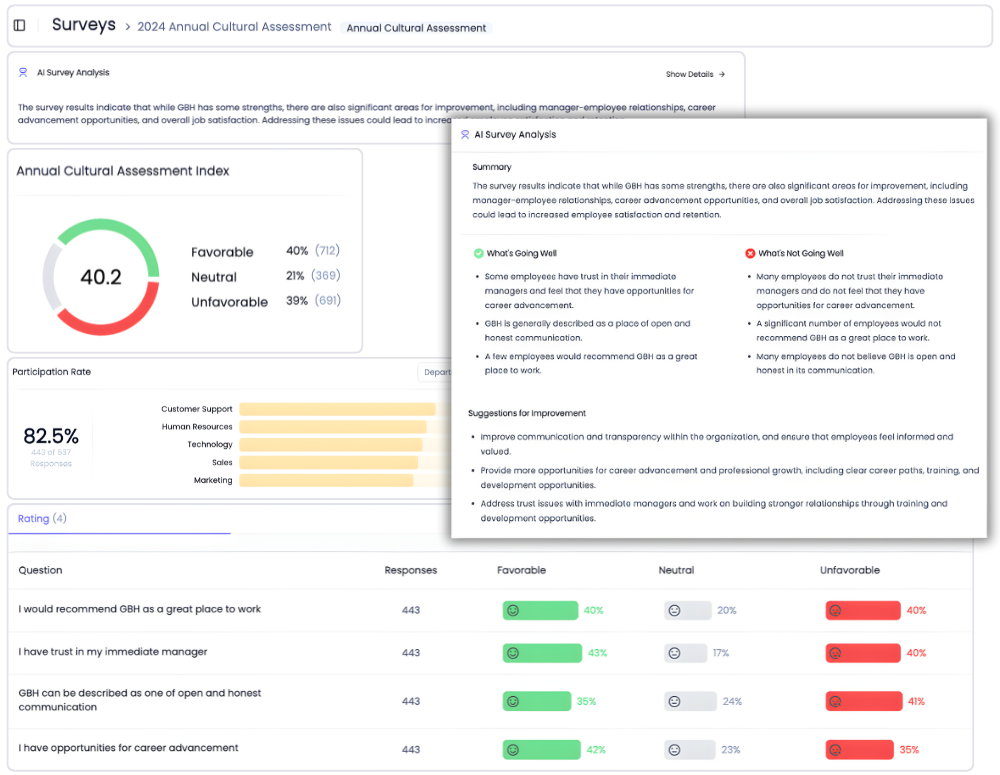
HRBench includes eNPS, pulse surveys, full engagement surveys, and exit interviews for every customer. Survey data flows directly into the same dashboards as your headcount, turnover, retention, and recruiting metrics.
Want to see the connection between low engagement and high attrition in one view? That's the default in HRBench. In Workday, it's a multi-vendor integration project.
Why Workday customers add HRBench to their stack
Most HR teams spend weeks pulling reports, cleaning spreadsheets, and stitching together dashboards across systems.
HRBench Analytics eliminates the manual work, so you can focus on driving action.
The conversations have changed from, ‘Here’s the data,’ to ‘I see the trend and the root cause.
.png)
Of my vendors, HRBench is the top of my list. We held onto trailing data from our prior system and integrated it seamlessly. Our team had to do zero lift.

“HRBench gave us confidence. We weren’t spending hours building dashboards anymore. We could focus on strategy, not reporting.”
.jpg)
Frequently Asked Questions
Common questions from HR teams comparing Workday reporting and HRBench.
No. HRBench is an analytics layer that sits on top of Workday. Your payroll, benefits, talent management, and HR operations stay in Workday. HRBench connects to your Workday data through a secure API and adds reporting, benchmarking, and predictive analytics capabilities that Workday's native tools make difficult to access without significant technical investment.
Yes. HRBench integrates directly with Workday through pre-built APIs. Data syncs automatically on a daily basis. No IT project, no middleware, and no manual data exports needed. Your Workday data flows into HRBench dashboards automatically.
Workday's native reporting is built for operational data retrieval. It supports custom reports, Discovery Boards, and scheduled report delivery. But building meaningful analytics requires knowledge of multiple report architectures (Matrix, Advanced, Composite), Prism Analytics licensing for cross-module analysis, and months of training. G2 reviewers consistently cite the steep learning curve. HRBench eliminates that complexity entirely. Metrics auto-calculate, dashboards are pre-built and customizable, and every team member can access and drill into data without technical training.
In most cases, no. Prism Analytics is Workday's add-on for blending external data, building advanced analytics, and creating cross-module reports. It requires additional licensing, data modeling expertise, and implementation time. HRBench provides cross-source reporting, predictive analytics, benchmarking, and executive dashboards out of the box. If your primary goal is workforce analytics and HR reporting, HRBench delivers what Prism Analytics promises at a fraction of the cost and complexity.
HRBench customers go live in under 7 days. Some have launched in as little as 24 hours. Your Workday data connects through a secure API, metrics auto-calculate, and benchmarks populate immediately. Workday implementations typically run 9 to 18 months for Core HCM. Getting value from the reporting layer requires additional training and configuration time beyond go-live.
Yes. This is one of the most common reasons Workday customers choose HRBench. Workday reports only on Workday data, and each module operates on isolated data frameworks. HRBench connects to 90+ HRIS and ATS platforms and unifies all your people data into a single dashboard. If you run core HR in Workday but track applicants in Greenhouse and engagement in Culture Amp, HRBench is the only place where all three data sources appear in the same report.
Workday HCM licensing typically ranges from $38 to $165 per employee per month depending on modules and company size. Prism Analytics is an expensive add-on, and many organizations purchase external BI tools (Power BI, Tableau) on top of Workday for adequate analytics, further increasing total cost of ownership. HRBench offers transparent mid-market pricing with engagement surveys, benchmarks, predictive analytics, and all reporting capabilities included for every customer. No per-module add-ons. No Prism Analytics fees. No external BI tool required.
Yes. HRBench includes eNPS, pulse surveys, full engagement surveys, and exit interviews for every customer. Survey data flows directly into your analytics dashboards. Workday does not include native engagement survey tools. Most Workday customers rely on separate vendors like Peakon or Glint, which require integration projects and ongoing maintenance.
Workday has invested in AI-powered analytics, including Augmented Analytics for surfacing workforce trends and risks. These are real capabilities. But they require Prism Analytics licensing and configuration to access. HRBench includes HRBie, a built-in AI assistant that lets you ask natural language questions about your workforce data and get instant answers. No additional module. No configuration. HRBie works the moment your data connects.
HRBench provides dedicated onboarding and live support. Customers consistently describe the team as feeling like an extension of their own HR department. Workday support operates through a tiered model. Complex reporting issues often require engagement with professional services or external consulting partners, adding cost and time.
Workday's native reporting and Prism Analytics are best for large enterprises with 1,000+ employees that have dedicated analytics teams, technical report writers, and the budget for Prism Analytics licensing and external BI tools. If you have the internal resources to manage multiple report architectures and a 9 to 18 month implementation timeline, Workday is a comprehensive enterprise platform.
HRBench is built for mid-market HR teams at PE-backed and growth-stage companies (500 to 5,000 employees) who need trusted workforce analytics and executive-ready dashboards without hiring an analytics specialist, purchasing Prism Analytics, or learning Workday's report-building tools. If your team is lean and leadership wants answers this quarter, HRBench is the faster path.
Schedule a 20-minute demo
See how HRBench transforms your HR data into insights, instant visibility, benchmarking, and data confidence.
- A walkthrough of HRBench's intuitive dashboards and analytics tools.
- Insights into integrating HRBench with your existing HR systems.
- Understanding how HRBench supports data-driven HR strategies.